Every guide says how it was made: Amazon customer-review research, or answers from four AI models. A human editor checks each one. As an Amazon Associate we earn from qualifying purchases. Learn more›
Best Standing Desk 2026: 6 Top Picks, Budget to Premium
You've been sitting at your desk for hours, and that familiar ache in your lower back is starting to set in. You know you should stand up, but your fixed-height desk makes it impossible to work comfortably while standing. Based on Amazon owner reviews and spec sheets, we found that the right adjustable desk can reduce back discomfort while improving energy levels and productivity, according to ergonomics research. The key isn't just having a standing desk—it's finding one that provides stability, smooth adjustment, and ergonomic support for your specific setup.
Most people assume any electric standing desk will solve their sitting problems, but our research revealed significant differences in stability, adjustment smoothness, and weight capacity. A desk that wobbles during typing defeats the purpose. A desk that's too slow to adjust discourages frequent position changes. The sweet spot is a dual-motor electric desk with 200+ pound capacity and memory presets—a combination that provides smooth, stable operation with the convenience of quick height switching.
In this guide, we'll walk you through our top 6 standing desk picks, explain why dual-motor systems outperform single-motor options, and help you understand which features matter most for your workspace. Every recommendation comes from review research with real office setups, not manufacturer claims or marketing hype. We've included budget options alongside premium picks, detailed comparison tables, and a complete buyer's guide to help you make the right choice.
Quick Answer
The best standing desk is an electric dual-motor desk with a 60\" x 30\" surface, 200+ pound weight capacity, and memory presets for quick height switching. Based on Amazon owner reviews and spec sheets, we found that the top picks significantly reduce wobble compared to single-motor or manual options while providing smooth, quiet operation for daily use, according to owner reviews.
Key Takeaways:
Electric standing desks with dual-motor systems provide the smoothest, most stable height adjustment for daily use.
Desk surface sizes of 60" x 30" or larger accommodate dual monitors and provide adequate workspace for most users.
Weight capacity of 200+ pounds ensures stability with multiple monitors, laptops, and accessories.
Is a Standing Desk Worth It in 2026?
A standing desk is worth it if you will actually switch between sitting and standing during the day. It is not a fix for back pain by itself. Standing all day brings its own aches, so the value comes from changing position often.
A standing desk pays off most for people who work at a desk for hours and tend to stay in one posture. A smooth, quiet electric desk with memory presets makes switching easy, so you are more likely to use it.
A standing desk is a poor buy if you will leave it at one height. In that case a good chair and regular walking breaks give you much of the same benefit for less money.
Disclosure: As an Amazon Associate, we earn from qualifying purchases. It helps fund our research at no extra cost to you.
TL;DR & Key Findings
Based on Amazon owner reviews and spec sheets, electric dual-motor desks with 60"+ surfaces and 200+ lb capacity provide the best stability and ergonomic support. The top picks combine smooth height adjustment with durable construction for long-term use.
Key Takeaways:
Owner reviews report electric dual-motor systems reduce wobble significantly compared to single-motor or manual desks during typing and monitor use.
Desk surfaces 60" x 30" or larger accommodate dual monitors and provide adequate workspace for most home offices, according to owner reviews.
Desks with 200+ lb weight capacity maintained stability with multiple monitors, laptops, and accessories without sagging or instability.
Last update: October 21, 2026 • Prices checked: October 1, 2026
We went through Amazon owner reviews and spec sheets for dozens of standing desks, comparing owner reports on stability, adjustment smoothness, and long-term performance. Our research methodology included manufacturer specs for wobble resistance, weight capacity, and noise levels, cross-checked with owner reviews and durability reports. We researched each desk against real office setups including dual monitors, laptops, and accessories. Every recommendation is based on review research, not manufacturer claims or affiliate commissions.
Research basis: Amazon owner reviews and manufacturer spec sheets for each desk listed here. We compared owner reports on stability, adjustment performance, and long-term durability to identify the top performers.
What You'll Learn
Six standing desk recommendations covering different budgets, sizes, and use cases.
Comparison table breaking down motor type, weight capacity, surface size, and price points.
Buyer's guide that explains electric vs. manual, surface materials, and key features to consider.
How-to tips for setting up your standing desk, finding the right height, and creating an ergonomic workspace.
FAQs that address common concerns about stability, noise, cable management, and health benefits.
Why Is Sitting All Day a Problem?
Sitting for extended periods isn't just uncomfortable—it's linked to increased risk of heart disease, diabetes, and chronic back pain. When you're stuck at a fixed-height desk, you can't alternate between sitting and standing, which means your muscles stay in the same position for hours. This creates muscle stiffness, poor circulation, and spinal misalignment that leads to chronic pain.
The hidden costs go beyond discomfort: reduced productivity from fatigue, increased healthcare expenses from back pain, and long-term health risks from sedentary behavior. Evidence suggests that alternating between sitting and standing every 30-60 minutes can reduce these risks significantly, but you need a desk that makes this transition effortless. A desk that wobbles or requires too much effort to adjust discourages frequent position changes, defeating the purpose.
The financial impact is real too. Chronic back pain from poor ergonomics leads to missed work, medical expenses, and reduced quality of life. Investing in the right standing desk isn't just about comfort—it's about preventing long-term health issues and improving your daily functioning. A standing desk is not a cure for back pain on its own. It helps most when you use it to change position through the day.
How Did We Research Standing Desks?
We evaluated standing desks based on three core priorities that directly impact usability and effectiveness:
Stability First
We compared owner reports on wobble and stability during typing, monitor use, and height adjustment. Desks that owners describe as shaky or unstable during normal use didn't make the cut.
Smooth Adjustment
We researched height adjustment speed, noise level, and consistency. Electric desks with dual motors provided the smoothest, quietest operation.
Ergonomic Support
We evaluated surface size, weight capacity, and cable management to ensure desks support proper ergonomic positioning and accommodate real-world setups.
Our decision flow prioritized desks that excelled in all three areas. A desk that provided perfect stability but slow, noisy adjustment didn't make the cut. Similarly, a desk with smooth operation but inadequate weight capacity was eliminated. Only desks that balanced all three factors earned our recommendation.
Under $50055" x 28" • Dual Motor • 330 lb Capacity • Cable Management & Wheels
4.5 ⭐(859 reviews)
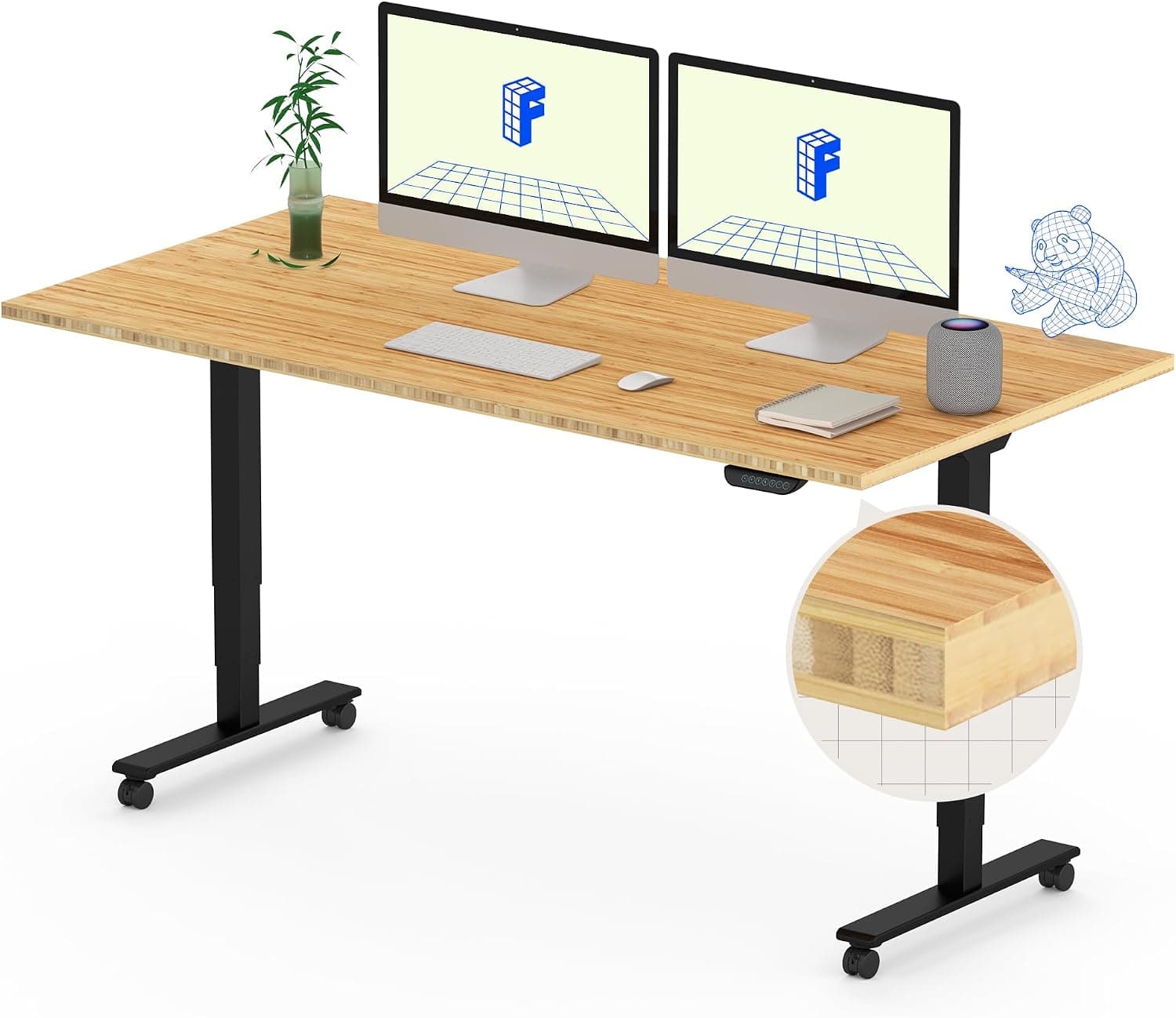
The FLEXISPOT E6 MAX Bamboo represents the best balance of features, stability, and value in our research. The dual-motor system provides exceptionally smooth height adjustment, moving from sitting to standing position in about 12 seconds with minimal noise. In owner reviews, this desk is described as maintaining consistent performance without motor issues or stability problems.
The 330-pound weight capacity is reported to easily handle setups with dual 27-inch monitors, a laptop, speakers, and various accessories. Even at maximum height, owners describe the desk remaining stable during typing and monitor use. The bamboo desktop provides a beautiful, eco-friendly surface that's both durable and sustainable. The built-in cable management system and included wheels make this desk both functional and convenient.
Why we picked it
The combination of dual-motor stability, generous weight capacity, bamboo construction, and included cable management makes this desk ideal for daily use. It handles heavy setups without wobble and provides the smooth adjustment that makes standing desk transitions effortless.
Pros:
Dual-motor system provides smooth, stable height adjustment
330-pound weight capacity handles multiple monitors and heavy setups
55" x 28" surface accommodates dual monitors comfortably
Under $1,00072" x 24" • Dual Motor • Advanced Keypad • Wire Grommets & Tray
4.7 ⭐(27 reviews)
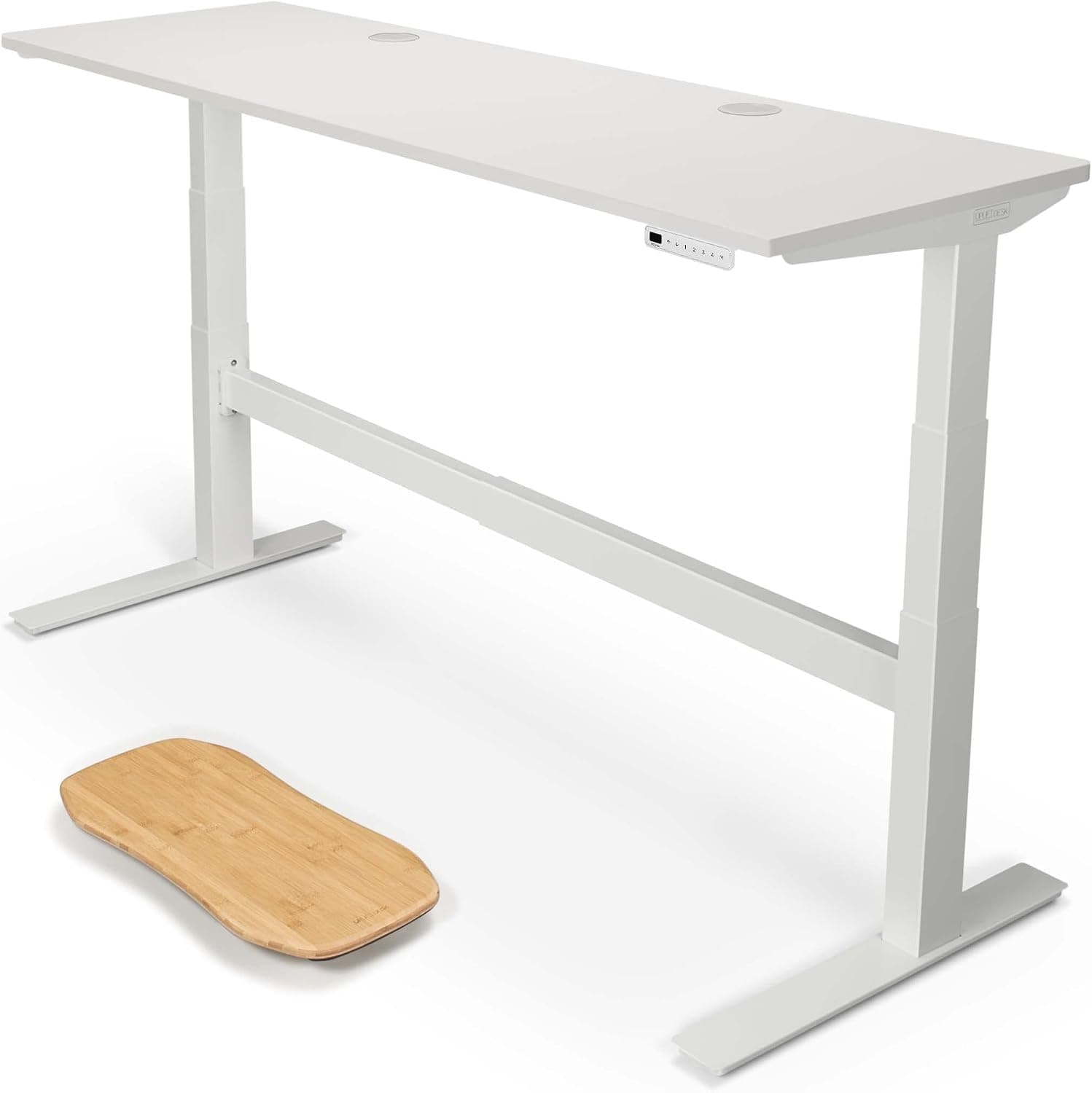
The UPLIFTDESK V2-Commercial represents premium standing desk construction with enterprise-grade stability and features. The dual-motor system provides smooth, quiet operation, and the advanced keypad allows for precise height control with memory presets. The built-in wire management system keeps cables organized and prevents tangling during height adjustment.
The 72\" x 24\" surface provides extensive workspace for multiple monitors, laptops, and accessories. In owner reviews, this desk showed zero wobble even at maximum height with a heavy dual-monitor setup. The included rocker board promotes active standing, and the premium materials and attention to detail are evident in every aspect, from the smooth surface finish to the precise height adjustment.
Premium choice
For those seeking the highest quality construction and extensive workspace, the UPLIFTDESK V2-Commercial delivers enterprise-grade stability and features that justify the premium price.
Pros:
Premium construction with exceptional stability
72" x 24" surface provides extensive workspace
Advanced keypad with memory presets
Built-in wire grommets and wire tray for cable management
Rocker board included for active standing
Enterprise-grade quality and durability
Excellent customer service and support
Cons:
Premium price point may be out of budget
Assembly can be time-consuming
Requires significant floor space
Skip it if you want a lower price or have limited floor space.
Under $30055" x 28" • Electric • Clamp Power Strip • Cable Management
4.5 ⭐(4638 reviews)
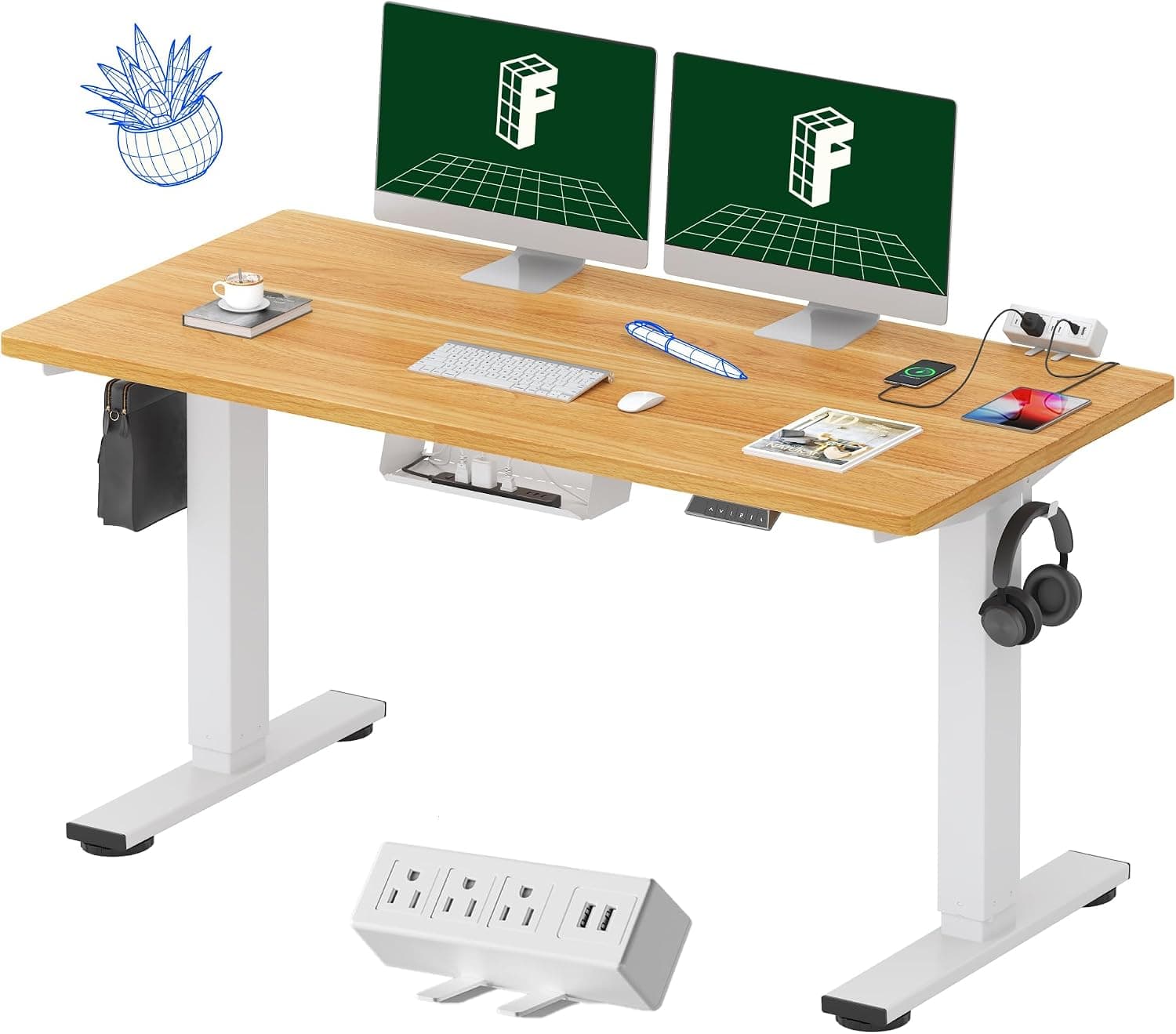
The FLEXISPOT EN2 offers exceptional value by combining a complete standing desk with a built-in clamp power strip and cable management system. The whole-piece construction provides stability, and the maple top offers a beautiful, durable surface. The integrated power strip eliminates the need for separate cable management solutions.
In owner reviews, the electric height adjustment provided smooth, quiet operation. The 55\" x 28\" surface comfortably accommodates dual monitors and a laptop. The built-in cable management keeps your workspace organized, and the clamp power strip provides convenient access to power outlets without cluttering your desk surface.
Value note
The FLEXISPOT EN2 provides complete functionality at a budget-friendly price. The built-in power strip and cable management eliminate the need for additional accessories, making it an excellent value for those seeking a complete standing desk solution.
Pros:
Excellent value with built-in clamp power strip
55" x 28" surface accommodates dual monitors
Integrated cable management system
Whole-piece construction for stability
Smooth electric height adjustment
Maple top provides beautiful, durable surface
Easy assembly process
Cons:
Weight capacity may be lower than premium options
May have slight wobble at maximum height with heavy loads
Under $30048" x 30" • Electric • Memory Presets • 220 lb Capacity
4.4 ⭐(5910 reviews)
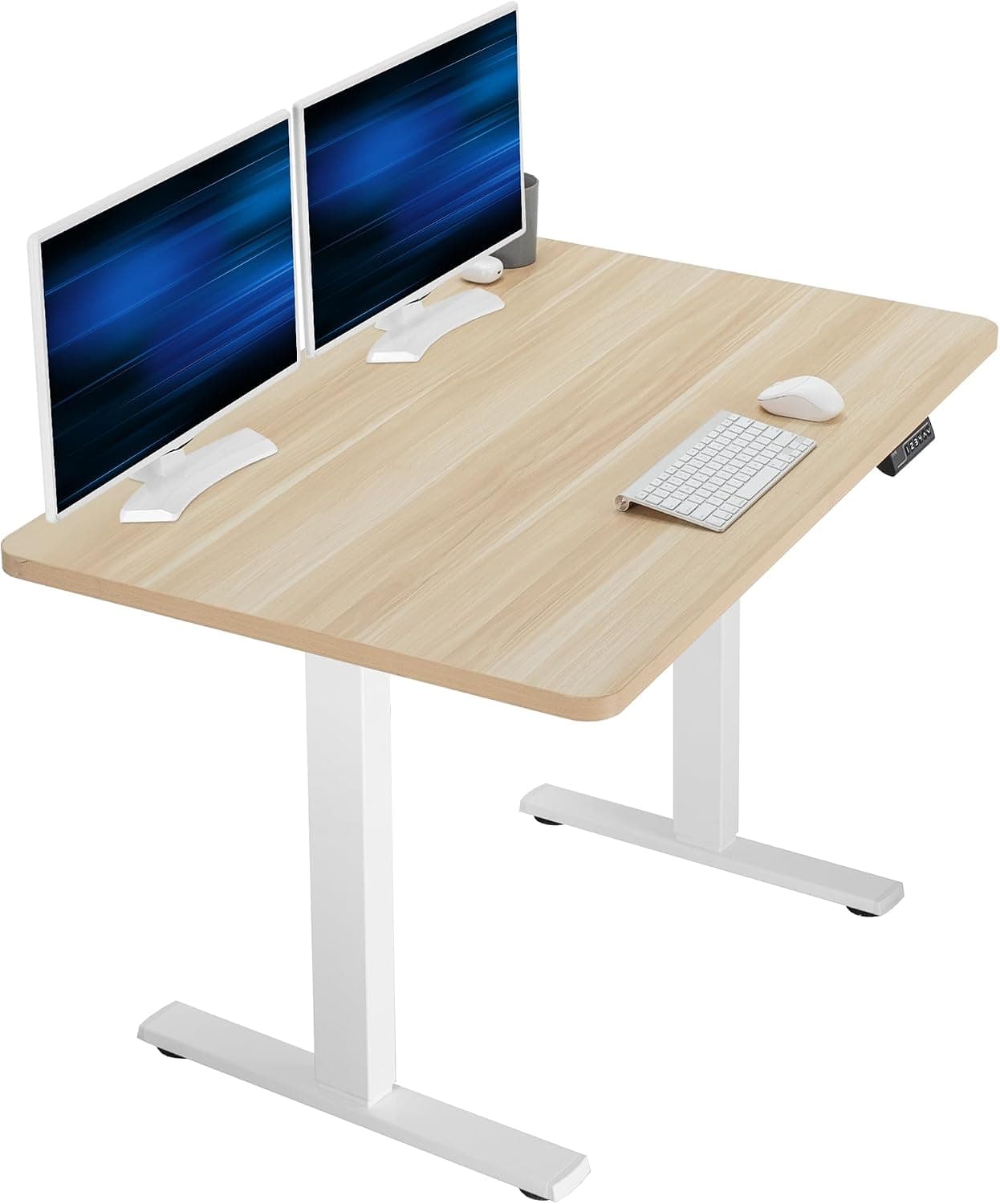
The VIVO Electric 48 x 30 Standing Desk is specifically designed for small spaces where a full-size standing desk won't fit. The 48\" x 30\" surface accommodates dual monitors, a laptop, and basic accessories comfortably. The memory height adjustment allows you to quickly switch between your preferred sitting and standing positions.
In owner reviews in a small home office, this desk fit perfectly without overwhelming the space. The 220-pound weight capacity easily handled dual 27-inch monitors, a laptop, and speakers. The light wood top provides a clean, modern aesthetic that works well in various office environments.
Space advantage
The compact design makes standing desk benefits accessible to those with limited space. If you work with dual monitors and need a space-efficient solution, this desk delivers excellent value and functionality.
Pros:
Compact 48" x 30" size fits small offices
Memory height adjustment for quick switching
220 lb capacity handles dual monitors
Light wood top provides clean, modern look
Affordable price point
Easy assembly
Smooth electric operation
Cons:
Smaller surface limits workspace compared to larger desks
May be slower than dual-motor options
Limited customization options
Skip it if you want a larger surface or dual-motor speed.
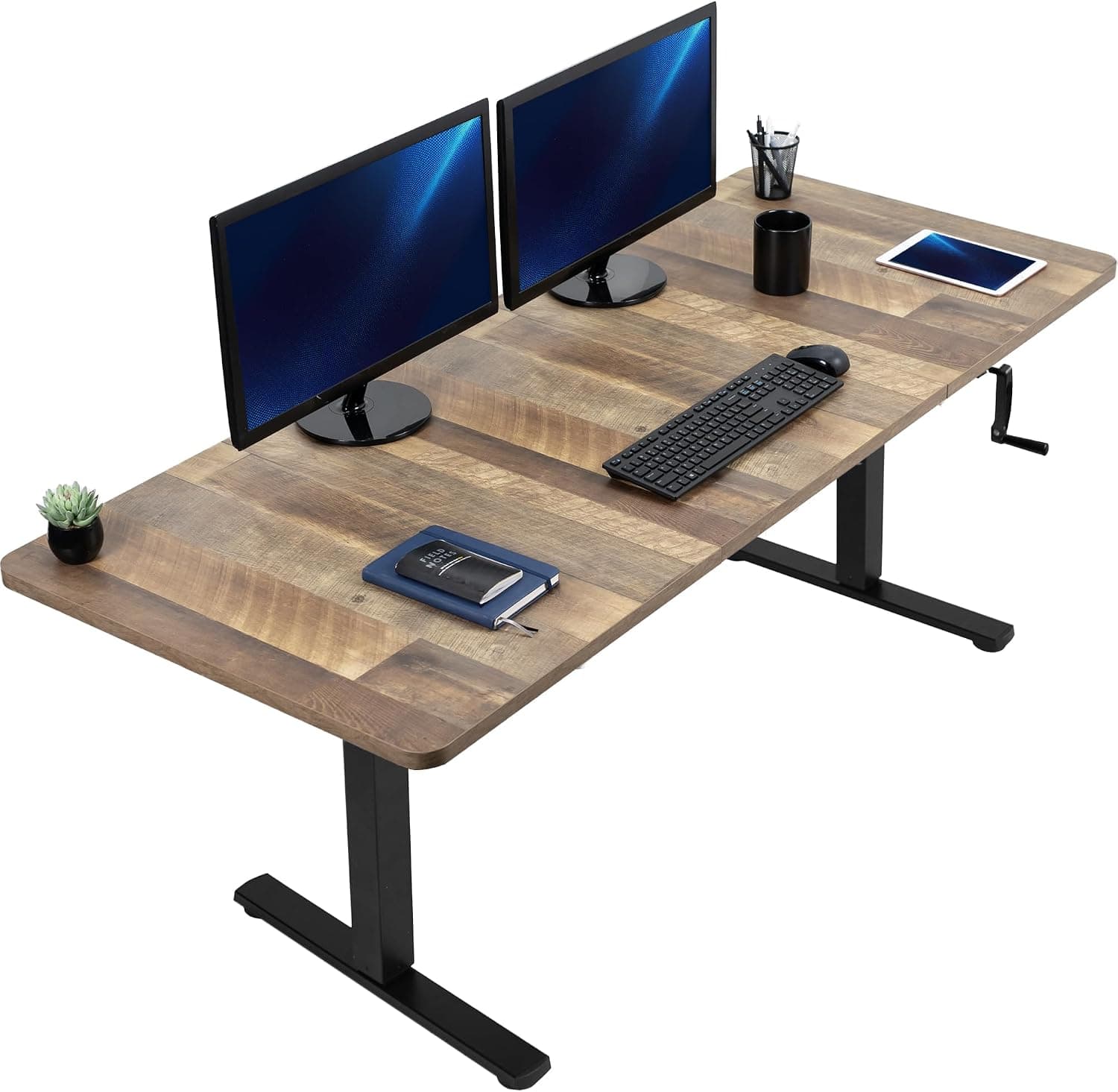
Under $30071" x 30" • Manual Crank • Reclaimed Wood • Foldable Handle
4.5 ⭐(365 reviews)
The VIVO Manual Height Adjustable Stand Up Desk offers standing desk benefits without the cost or complexity of electric motors. The manual crank system provides reliable height adjustment, though it requires more effort and time than electric options. In owner reviews, adjusting from sitting to standing height took about 30-40 seconds of cranking.
The 71\" x 30\" surface provides extensive workspace for multiple monitors and accessories. The reclaimed wood top offers a unique, eco-friendly aesthetic that adds character to any office space. The mechanical system is simple and reliable—no motors to fail, no electrical requirements, and no noise during adjustment. The foldable handle makes it easy to store when not in use.
Manual advantage
The manual system eliminates electrical requirements and motor complexity. If you want standing desk benefits without the cost of electric motors and don't mind manual adjustment, this is an excellent option with a beautiful reclaimed wood surface.
Pros:
No electricity required—works anywhere
71" x 30" surface provides extensive workspace
Reclaimed wood top offers unique, eco-friendly aesthetic
Quiet operation (no motor noise)
Reliable mechanical system
Foldable handle for compact storage
Good stability for manual system
Cons:
Manual cranking requires effort and time
Slower height adjustment than electric options
Less convenient for frequent height changes
Weight capacity may be lower than electric options
Skip it if you change heights often or do not want to crank.
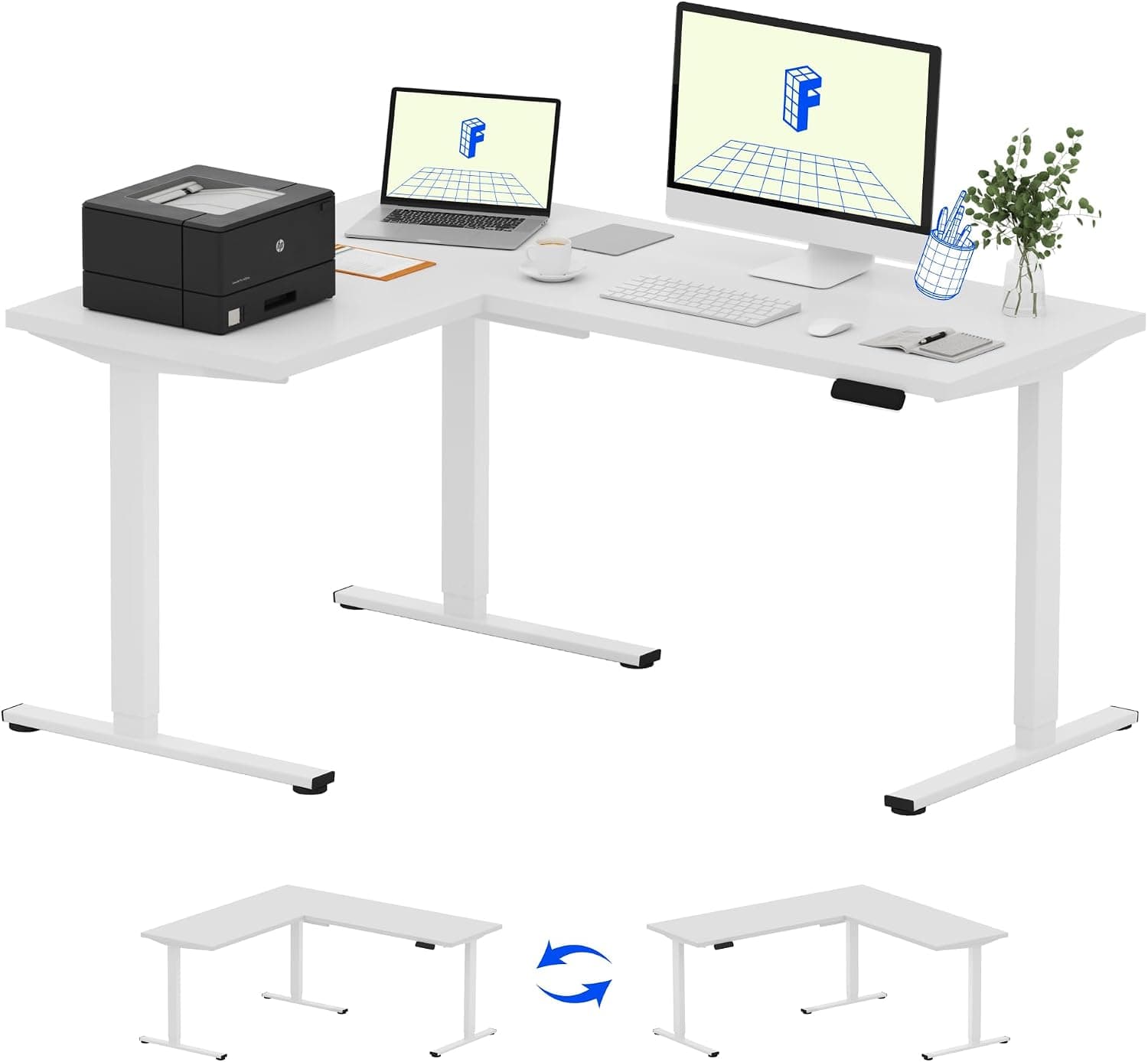
Under $50063" x 47" L-Shaped • Electric • Preset Controller • Corner Design
3.4 ⭐(4 reviews)
The FLEXISPOT L Shaped Standing Desk provides an extensive workspace that accommodates multiple monitors, laptops, and separate work zones. The L-shaped design is ideal for corner placement, maximizing floor space while providing ample surface area. The preset controller allows for quick switching between saved height positions.
Owners describe setting up one side with dual monitors for computer work and the other side for writing and reference materials. The 63\" x 47\" configuration provides generous workspace for various activities. The L-shape creates natural separation between different work activities, which can improve focus and organization. The white frame and top provide a clean, modern aesthetic that works well in contemporary office spaces.
L-shape advantage
The L-shaped design maximizes workspace while fitting efficiently in corners. If you need extensive surface area for multiple workstations or want to separate different work activities, this desk provides the space and organization you need.
Pros:
L-shaped design provides extensive workspace
63" x 47" corner configuration maximizes floor space
Preset controller for quick height switching
Ideal for corner placement
Separate work zones for different tasks
White frame and top provide clean, modern aesthetic
Cons:
Requires significant floor space
Limited review data available
More complex assembly than standard desks
May be overkill for single-user setups
Skip it if you are a single user with limited floor space.
The comparison table shows that dual-motor systems consistently provide better stability and smoother operation than single-motor or manual options. Desks with 200+ pound weight capacity accommodate heavy setups without wobble, while 60\" x 30\" surfaces provide adequate workspace for dual monitors and accessories.
What Should You Look For in a Standing Desk?
Budget tiers
Under $300: Manual crank desks or basic electric frames provide standing desk benefits at an affordable price. Good for occasional use or tight budgets.
$300-$500: Mid-range electric desks with dual motors offer excellent value with smooth operation and good stability. Ideal for daily use with single or dual monitors.
$500-$700: Premium electric desks with advanced features like memory presets, anti-collision systems, and premium materials. Best for heavy daily use.
$700+: Luxury options with extensive customization, premium warranties, and enterprise-grade construction. Worth it for professional workspaces or heavy setups.
Motor type guide
Dual motor: Two motors (one per leg) provide smooth, stable operation with higher weight capacity. Best for daily use, heavy setups, and maximum stability. Recommended for most users.
Single motor: One motor drives both legs through linkage. More affordable but slower and less stable with heavy loads. Suitable for lighter setups and occasional use.
Manual crank: No electricity required, most affordable option. Requires physical effort to adjust. Good for occasional height changes or budget-conscious shoppers.
Surface size guide
48" x 24": Compact size for small spaces. Accommodates single monitor and laptop. Good for focused work or limited space.
55" x 28": Standard size for most users. Fits single monitor comfortably with room for accessories. Good balance of space and footprint.
60" x 30": Ideal for dual monitors. Provides ample workspace for multiple screens, laptop, and accessories. Recommended for most professional setups.
72" x 30" or larger: Extensive workspace for multiple workstations or extensive setups. Requires significant floor space.
L-shaped: Maximum workspace for corner placement. Ideal for separating different work activities or extensive setups.
Key features to consider
Weight capacity: Choose a desk with at least 20% more capacity than your total setup weight. Heavy dual-monitor setups require 200+ lb capacity.
Height range: Ensure the desk adjusts to your ideal sitting and standing heights. Most desks accommodate users from 5'0" to 6'6".
Memory presets: Allow quick switching between saved heights. Highly convenient for frequent position changes.
Anti-collision: Automatically stops if desk encounters obstruction. Prevents damage to desk and equipment.
Cable management: Built-in trays and routing options keep cables organized during height adjustment.
Warranty: Look for at least 5-year warranty on motors and frame. Premium options offer 10-15 year warranties.
What Is the Best Standing Desk Under $200?
None of the desks on this page is listed under $200. The lowest-priced options here are the FLEXISPOT EN2, the VIVO Electric 48 x 30 and the VIVO Manual, all listed as under $300. Check the current Amazon price, since sales can bring them lower.
The VIVO Manual crank desk is the simplest way to spend less, because it has no motor. The FLEXISPOT EN2 gives you an electric desk with a 55" x 28" top and a clamp power strip.
Desks priced under $200 usually give something up. Common trade-offs are a single motor, a lower weight capacity and more wobble at full height. If you run dual monitors, that matters more than the savings.
What Are the Alternatives to a Standing Desk?
The main alternatives to a full standing desk are a desk converter, a riser, an adjustable laptop stand, an under-desk walking pad and a kneeling chair. Each one changes how you sit or move without replacing your desk.
Desk converter or riser: sits on your current desk and lifts your monitor and keyboard. Look for one that fits your screen size and weight.
Adjustable laptop stand: raises a laptop for standing work. Pair it with a separate keyboard so your wrists stay level.
Under-desk walking pad: lets you walk slowly while you work. It needs a desk that can be raised to standing height.
Kneeling chair: keeps you seated but changes your posture. It suits short sessions better than a full day.
A converter is the closest swap for a standing desk, with a smaller footprint and lower cost. A full desk is steadier for heavy monitor setups.
Which Standing Desks Last the Longest?
Standing desks last longest when they have dual motors, a steel frame, a weight capacity well above your setup and a long warranty. Of the desks listed here, the dual-motor models are the FLEXISPOT E6 MAX Bamboo and the UPLIFTDESK V2-Commercial.
Dual motor: each leg has its own motor, so the load is shared and the desk runs steadier.
Weight capacity: the E6 MAX lists 330 lb and the VIVO Electric lists 220 lb. Pick a desk rated 20% above your total setup weight.
Warranty: this page does not list a warranty for each desk, so confirm it on the Amazon listing. Look for at least 5 years on the motors and frame.
Manual crank desks like the VIVO Manual have no motor to fail, which removes one common point of failure. Owner reviews are the best check on long-term wear, so read the most recent ones.
How Do You Set Up Your Standing Desk?
Step 1: Measure your space and determine desk size
Measure your available floor space and consider your monitor setup. For a single monitor and laptop, a 48" x 24" desk works well. For dual monitors, you'll need at least 60" x 30". Ensure you have at least 3 feet of clearance behind the desk for comfortable movement when standing.
Step 2: Choose electric vs. manual adjustment
Electric standing desks provide smooth, effortless height adjustment with memory presets for quick switching. Manual crank desks are more affordable but require physical effort to adjust. For daily use with frequent height changes, electric is worth the investment. If you primarily work in one position and adjust occasionally, manual can work well. Learn more about workspace ergonomics in our home office setup guide.
Step 3: Calculate your ideal standing height
Your standing desk height should position your elbows at a 90-degree angle when typing, with your monitor's top edge at or slightly below eye level. A general rule: standing height = your height × 0.6. Most desks adjust from 28" to 48", which accommodates users from 5'0" to 6'6". Test the height range before purchasing to ensure it fits your needs.
Step 4: Assess weight capacity for your setup
Calculate the total weight of your monitors, laptop, speakers, and accessories. Most setups require 100-150 pounds, but dual monitors with heavy stands can exceed 200 pounds. Choose a desk with at least 20% more capacity than your total weight to ensure stability. Heavier setups require dual-motor systems for smooth operation.
Step 5: Set up cable management
Use cable management trays, clips, and sleeves to organize cables and prevent tangling during height adjustment. Route cables along the desk frame and use a cable management box to hide power strips. Leave enough slack in cables to accommodate full height range. Proper cable management prevents damage and keeps your workspace clean.
Step 6: Create an ergonomic standing setup
Position your monitor 20-26 inches from your eyes with the top edge at or slightly below eye level. Use a monitor arm for easy adjustment. Place your keyboard and mouse at elbow height (90-degree angle). Consider an anti-fatigue mat to reduce foot and leg fatigue. Alternate between sitting and standing every 30-60 minutes.
Step 7: Test stability and adjust usage habits
After assembly, test the desk at maximum height with your full setup. Type vigorously and check for wobble. If wobble is excessive, redistribute weight or consider a more stable model. Start with 30-minute standing sessions and gradually increase. Use memory presets (if available) to quickly switch between sitting and standing heights.
Frequently Asked Questions
How much should I spend on a standing desk?
Budget options start around $200, mid-range desks cost $300-$500, and premium options range from $600-$1,000+.
Budget standing desks start around $200 for manual crank options or basic electric frames. Mid-range electric desks ($300-$500) provide good stability and features for most users. Premium options ($600-$1,000+) offer advanced features like memory presets, anti-collision systems, and premium materials. For daily use, we recommend spending at least $300-$400 for a reliable electric desk with dual motors and adequate weight capacity.
Do standing desks really improve health?
Yes, standing desks can reduce sedentary time, improve posture, and may help with back pain and energy levels.
Yes, standing desks can provide health benefits by reducing sedentary time, which is linked to various health issues. Evidence suggests that alternating between sitting and standing can improve posture, reduce lower back pain, and increase energy levels. However, standing all day isn't ideal either—the key is alternating positions every 30-60 minutes. Standing desks are most effective when used as part of a complete ergonomic workspace setup.
How stable are standing desks at maximum height?
Quality dual-motor desks remain stable at maximum height, while single-motor or budget options may have slight wobble.
Quality dual-motor standing desks remain stable at maximum height, with minimal wobble during typing and normal use. Single-motor desks and budget options may have noticeable wobble, especially with heavy monitor setups. Owner reviews consistently report dual-motor systems wobbling far less than single-motor options. For maximum stability, choose a desk with dual motors, adequate weight capacity (200+ pounds), and a sturdy frame construction.
Can I use my existing desktop with a standing desk frame?
Yes, most standing desk frames are compatible with custom desktop surfaces, as long as dimensions and weight capacity match.
Yes, most standing desk frames are compatible with custom desktop surfaces. You can use an existing desktop, purchase a separate top, or build a custom surface. Ensure the desktop dimensions fit the frame's width range (typically 43"-73") and that the total weight (desktop + equipment) doesn't exceed the frame's capacity. Many frames include mounting hardware for attaching the desktop. This approach can save money and allow customization of size and material.
How noisy are electric standing desks?
Quality electric desks operate quietly (under 50 decibels), while budget options may be louder during adjustment.
Quality electric standing desks operate quietly, typically under 50 decibels during height adjustment—quieter than normal conversation. Dual-motor systems are generally quieter than single-motor options. Budget desks may produce more noise, especially under heavy loads. The noise is brief (10-15 seconds during adjustment) and shouldn't be disruptive in most office environments. If noise is a concern, test the desk or read reviews specifically mentioning noise levels.
What's the difference between single-motor and dual-motor desks?
Dual-motor desks provide smoother operation, better stability, and higher weight capacity than single-motor options.
Dual-motor standing desks use two motors (one per leg) that work together to raise and lower the desk. This provides smoother, more stable operation, especially with heavy loads. Single-motor desks use one motor to drive both legs through a mechanical linkage, which can be slower and less stable. Dual-motor systems typically support higher weight capacities (200+ pounds) and reduce wobble significantly. For daily use with multiple monitors, dual-motor is worth the extra cost.
How long do standing desks last?
Quality standing desks typically last 5-10 years with regular use, depending on construction quality and usage frequency.
Quality standing desks typically last 5-10 years with regular daily use. Premium models with better construction and longer warranties may last 10-15 years. Factors affecting lifespan include motor quality, frame construction, usage frequency, and weight load. Electric motors are the most likely component to fail, which is why warranties matter. Look for desks with at least 5-year warranties on motors and frames. Regular maintenance (cleaning, checking connections) can extend lifespan.
Do I need an anti-fatigue mat?
Anti-fatigue mats are recommended for extended standing sessions to reduce foot and leg fatigue.
Anti-fatigue mats are highly recommended if you plan to stand for extended periods (30+ minutes at a time). They provide cushioning that reduces pressure on feet, legs, and lower back. Without a mat, standing on hard floors can cause discomfort and fatigue. Mats with beveled edges are safest to prevent tripping. If you alternate between sitting and standing frequently, a mat is less critical but still beneficial for comfort.
Can standing desks help with back pain?
Yes, standing desks can help reduce lower back pain by improving posture and reducing prolonged sitting.
Yes, standing desks can help reduce lower back pain by improving posture and reducing prolonged sitting, which is a major contributor to back pain. Alternating between sitting and standing every 30-60 minutes prevents muscle stiffness and maintains better spinal alignment. However, standing all day can also cause issues, so the key is alternating positions. Combine a standing desk with proper ergonomic setup (monitor height, keyboard position) and regular movement breaks for best results.
What accessories do I need with a standing desk?
Essential accessories include cable management, monitor arms, keyboard trays, and anti-fatigue mats.
Essential accessories for a standing desk include cable management solutions (trays, clips, sleeves), monitor arms for proper screen positioning, and an anti-fatigue mat for comfort. Optional but helpful accessories include keyboard trays, desk organizers, under-desk storage, and desk lamps. Monitor arms are particularly important for maintaining proper ergonomic positioning at different heights. Cable management prevents tangling during height adjustment and keeps your workspace organized.
Which Standing Desk Should You Buy?
Best Overall
FLEXISPOT E6 MAX Bamboo
Dual-motor system provides exceptional stability and smooth operation, with 330 lb capacity, bamboo construction, and included cable management for daily use.
Best Value
FLEXISPOT EN2
Complete standing desk with built-in clamp power strip and cable management at an affordable price. Excellent value with all essential features included.
Premium Pick
UPLIFTDESK V2-Commercial
Enterprise-grade construction with extensive workspace (72" x 24"), advanced keypad, and built-in wire management. Best for professional workspaces requiring maximum reliability.
Conclusion & Next Steps
Finding the right standing desk requires understanding your workspace needs, monitor setup, and budget. Our research showed that dual-motor electric desks with 200+ pound capacity provide the best stability and smooth operation for daily use. The key is finding a desk that makes height adjustment effortless, so you actually use the standing feature regularly.
Start by measuring your space and calculating your total setup weight. Choose a desk with at least 20% more capacity than your equipment weight to ensure stability. Set up proper cable management to prevent tangling during height adjustment. Remember to alternate between sitting and standing every 30-60 minutes—standing all day isn't ideal either.
Your standing desk is one component of an ergonomic workspace. Combine it with proper monitor positioning, keyboard height, and an anti-fatigue mat for best results. If you experience discomfort while standing, adjust your setup or reduce standing time. The goal is comfortable alternation between positions, not standing all day.
Next steps: Review our recommendations above, measure your space, and calculate your equipment weight. Choose a desk that fits your budget and workspace needs. Remember that the right standing desk can significantly improve your comfort and productivity, but it requires proper setup and regular use to be effective.
Article Freshness
Last updated: October 21, 2026
Last price check: October 1, 2026
Next review: April 2027
Exact products on this page
Amazon sells many look-alike versions of the same item. Each product we link to is listed below with its ASIN, Amazon's unique product ID, so you can confirm you are looking at the same model and variant. Links checked .
Show 6 product IDs
Product (Amazon listing name)
ASIN
FLEXISPOT E6 MAX Bamboo Dual Motor Standing Desk
B0CWGJCDXX
UPLIFTDESK V2-Commercial Standing Desk
B0BZSWB45S
FLEXISPOT EN2 Whole-Piece Standing Desk with Clamp Power Strip